Petro's Articles

15 Best Techniques and Effects for Editing Cinematic Wedding Videos
Fifteen editing moves borrowed straight from cinema, that’s what gives Bride&Groom.video’s wedding films their polish, and each gets unpacked with a video example. The list runs through shot sequencing, over-the-shoulder framing, match cuts on light, motion, and color, the Kuleshov effect for emotional beats, and composition staples like the rule of thirds. For videographers and…

Wedding Videography Shot List: Capturing That Big Day Story
Run through the whole wedding day in order and you’ve got this shot list, a moment-by-moment checklist for videographers. It moves from getting-ready and detail shots into the ceremony (processional, vows, ring exchange, recessional), through cocktail hour, and across the reception (introductions, speeches, first dance, cake cutting, dancing, send-off), each block with a rough time…
The Wedding Video Editing Checklist: How It Helps
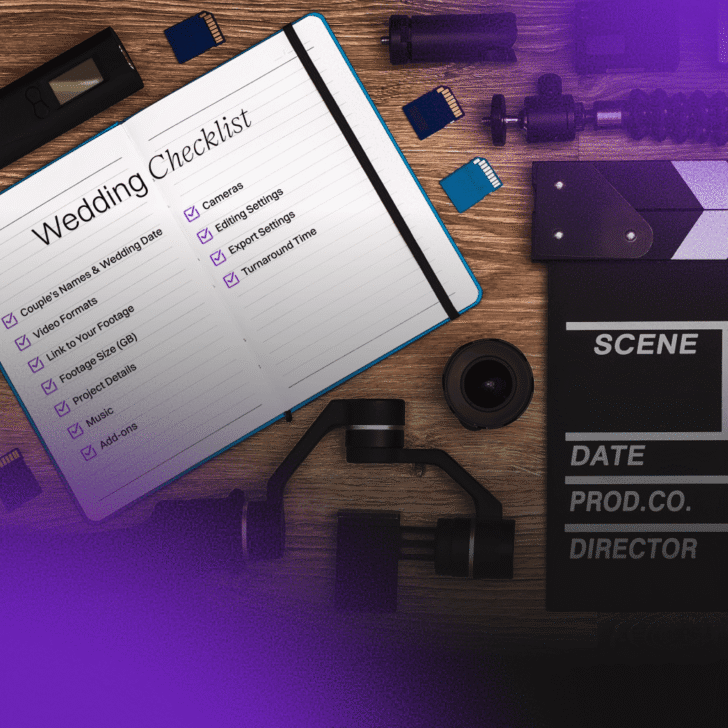
As wedding films lean harder into creative highlights and teasers, a checklist is what keeps the project from sliding into chaos. The eleven sections Bride&Groom.video tracks get a run-through, from couple’s names and footage links to formats, music, cameras, and editing and export settings, right down to turnaround. The payoff is fewer slip-ups, clearer communication,…

Sync Multiple Cameras in DaVinci Resolve and Premiere Pro
When a videographer sends footage to post-production, the editor confronts the challenge of working with two or more cameras simultaneously. Beginners often sync the cameras and begin cutting them sequentially. However, this approach is suboptimal as it consumes a significant amount of the editor’s time reviewing footage from each camera. While artificial intelligence can handle…


Shooting Weddings for Reels and Stories (9:16)
More couples want their highlights vertical for Reels, Stories, and TikTok, and shooting 9:16 well is the focus here. The upside is reach, full-screen viewing, and room to experiment; the catch is composing for a tall, narrow frame. Practical pointers center on wide-angle glass like the Sony 16-35mm or Tamron 17-28mm, dialing in the gimbal…

How To Use GoPro To Create Mind-Blowing Wedding Videos
A GoPro will never stand in for your main camera, but slipped into the right place it captures angles nothing else can. The ideas here include hiding one in the couple’s getaway car, behind the ceremony arch, on the dog’s collar, inside the bridal bouquet, or chest-mounted for a first-person view, with field tips like…


Mastering Project File: A Guide For Wedding Videographers and Editors
Lost in messy projects? Learn how to organize your video editing workflow for faster, stress-free edits. Stay efficient and in control!


Secrets of Exposure in Wedding Videos
Drawing on the mistakes an editing team sees most, this post is a set of exposure habits for wedding shooters. Shoot manual, stay near native ISO, ride the zebra function so a white dress doesn’t blow out, guard your shadow detail, and lean on ND filters and added light rather than cranking ISO. It also…


What Proxies are & How to Generate and Relink Them
Working as an external editing team with our client videographers, we have found some tricky moments with proxy video files, not known to everyone. To ensure videographers and editors are on the same page, we’ve created this complete guide on using proxy videos while outsourcing editing.


Which is better: DaVinci Resolve vs. Adobe Premiere Pro or Final Cut Pro?
Premiere Pro, DaVinci Resolve, or Final Cut Pro? The three editing programs go head to head here, with each one’s strengths, platforms, and signature features laid out, plus Bride&Groom.video’s lead editors naming personal favorites. No universal winner emerges; the right call hinges on your operating system, how deep your color work goes, and what you…


Best Color Grading and LUTs for Wedding Videos in 2026
LUTs can set a mood, lock in a signature look, or chase a cinematic feel, and this overview lays out what they do and which collections still hold up, breaking the Timbre presets down one by one. The candid takeaway: the best LUT is usually one built for your own footage, and Bride&Groom.video can reverse-engineer…


Using LUTs In Davinci Resolve: 10 Common Mistakes To Avoid
Ten reasons why turn up here, each with a way out, all framed around DaVinci Resolve. The culprits include matching a LUT to the wrong profile, grading blind without scopes, leaning on the LUT instead of per-clip work, fighting it under colorful dance-floor lights, and stacking nodes in the wrong order. Before-and-after frames make every…